Source Audio Ultrawave Multiband Processor 2022 Black
$249.00
- Condition
- New
- Category
- Effects and Pedals / Tremolo
- Shipping
-
Free to the lower 48
ULTRAWAVE MULTIBAND PROCESSOR
The Ultrawave Multiband Processor embarks on a pioneering journey into the advanced potential of overdrive and tremolo, exploring a brave new universe of sounds yet unheard. At the Ultrawave’s core is a dynamic and multi-dimensional approach known as multiband processing. This process splits the frequency spectrum of a guitar, bass, or synthesizer into multiple, discrete frequency bands and equips each band with its own array of adjustable parameters. In the case of overdrive, the Ultrawave splits the incoming signal and provides separate drive and output level controls for each individual band. The result is a thick and rich distortion with loads of unique overtones and dynamic interplay. Split the signal into 1, 2, 3, 4, 8, or 10 frequency bands, and apply any of the band splitting options to an exciting collection of overdrive types, including Tube, Diode, Foldback (a method of distortion often heard in the world of synthesizers), Octave Up, Negative Flip Diode, and more. Plug in, turn up, and explore the wonders of multiband processing built on over a decade of refinement and experimentation.
The Power of Presets: The Neuro Desktop Editor & Mobile App
The Ultrawave also has an incredible companion collection of innovative sound processing blocks to take sound creation into vast new directions. These are found in the Neuro Desktop Editor (free editing software for Mac or Windows) or Neuro Mobile App (free for iOS and Android). All presets created in the Neuro editors can be loaded directly to the pedal, saved to a personal, cloud-based preset library, and published to the Neuro Community to be easily accessed by other Ultrawave owners. The dual channel compressor block includes studio level controls that can be placed before or after the drive circuits. The Multiband Tremolo block provides individual control of each band's tremolo depth, rate, and start time as well as its LFO wave shape. Changing the LFO wave shape and varying the tremolo start times of each frequency band creates fantastically propulsive sounds reminiscent of sequencer or arpeggiator effects. The LFO’s Ring Mod option creates waves of retro/futuristic industrialism. The Morph feature explores the marvelous potential of sound morphing, which allows musicians to smoothly transition from one super-charged tone to another with an external expression pedal, LFO, or envelope follower. The Ultrawave also has advanced stereo features that can send entirely different drive effects to each of the outputs for a wide stereo field, place the effect in two places in a signal chain, or generate mind-spinning, ping-pong tremolo effects.
Download The Ultrawave Preset Package
Check out our curated package of Ultrawave Multiband Processor presets. This package contains an all-encompassing range of sounds, from traditional high-gain, medium gain, tremolo, and compressor tones to contemporary trailblazers like multiband tremolo and foldback distortion. It's an easy way to get an idea of the wide range of tones available in the Ultrawave. Use these sounds as is or as a jumping off point to create and publish your own custom presets. There are two ways you can download the package:
1. Download the Ultrawave Backup File from Source Audio website. This file instantly uploads the entire UW Preset Package to your pedal. After downloading the package go to DEVICE in the top-bar navigation of the Neuro Editor and select LOAD DEVICE BACKUP then follow the prompts.
2. Download Individual Ultrawave Presets from Source Audio website. This is a .zip folder containing each individual preset in the UW Preset Package. After downloading and opening the .zip folder, select the IMPORT option, under the Device tab in the top right corner of the Neuro Desktop Editor. This option allows you to upload one preset at a time to your Ultrawave.
Ultrawave vs. Ultrawave Bass: What's the Difference?
One Editing Experience
For ultimate rig flexibility, the Ultrawave and Ultrawave Bass pedals share the exact same Neuro App and Desktop Editor, and presets can be created and shared freely between the two pedals. So what makes them different?
It's All About Flavor
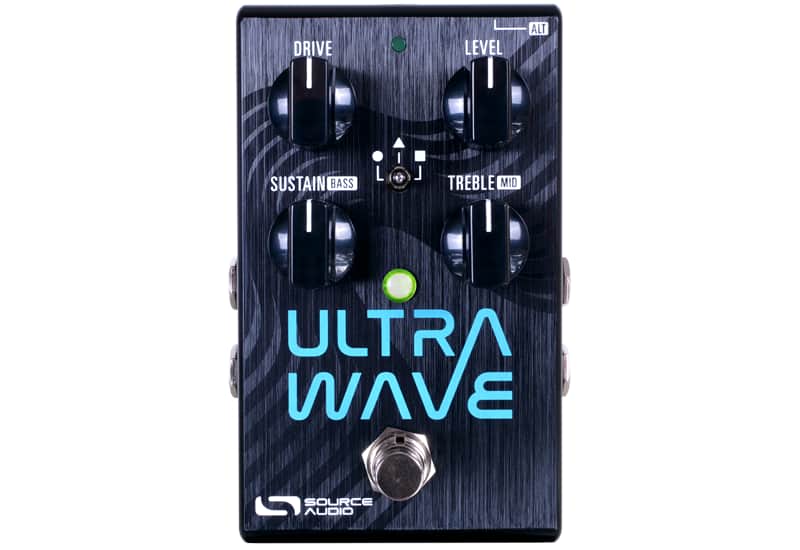
The Ultrawave comes equipped with a "Sustain" knob on its surface, while the Ultrawave Bass is armed with a "Mix" knob by default. Additionally, the six top-loaded presets on the Ultrawave Bass were handcrafted by our virtuoso bass expert, Nathan Navarro, whereas the presets on the Ultrawave are more geared toward midrange guitar frequencies.
Pedal Features
37 Different Band Splitting Options: Band Splitting options including single, 2, 3, 4, 8, and 10 bands. Each band splitting option includes several sub-sets with different band splitting frequency points.
44 Different Distortion Types: Choose from distortion/overdrive/fuzz types that include Tube, Diode, Foldback, Negative Flip Diode, Octave Up, and more.
Dual Channel Compressor/Expander: Compressor features Input Gain, Threshold, Ratio, Attack, Release, and Output Gain controls with a detailed graphic monitor. Use the dual channel capabilities to isolate compression to specific frequencies. Place the compressor/expander before or after the overdrive module.
Growing Library of Published Presets: For quick and easy access to a world of great tones, try sampling sounds from a vast collection of published presets created by the Source Audio team and the ever-growing Ultrawave Neuro Community.
Stereo Ins and Outs: Create two entirely different presets and run them in series, parallel or run each to a separate output. Stereo options also apply to the Multiband Tremolo - use the Channel 1/Channel 2 Sync options or the Phase Offset control to create stereo ping-pong, tremolo effects.
Detailed LFO Controls: Use the LFO module to control the Ultrawave's Tremolo, Morphing or Ring Mod features. Choose between a standard Sine Wave or use the Attack/Release controls to create highly customized LFO shapes.
Sound Morphing: Change from one sound to another with an expression pedal, envelope follower or LFO.
8 Band Graphic Equalizer
Adjustable Noise Gate
Assignable Knobs: Reassign all four of the Ultrawave's knobs to the parameters most useful for making quick, on-stage changes. Save a different set of knob assignments for every preset.
External Expression Pedal Control: Make simultaneous, on-the-fly changes of up to three parameters with an external expression pedal.
6 Toggle Switch Accessible Presets: Quickly access up to 6 pedal presets with the Ultrawave's toggle switch.
Universal Bypass — Select either analog buffered or relay based True Bypass.
MIDI Capable — Connect the Ultrawave to the Source Audio Neuro Hub and access up to 128 presets with MIDI Program Change (PC) messages. Control many of the pedal’s parameters with MIDI Continuous Controller (CC) messages or assign LFO modulation speed with MIDI Clock.
USB Port - Class compliant USB-MIDI allows the Ultrawave to work as a plug-and-play device with recording software running on Mac and Windows. The USB port offers connectivity to the Neuro Desktop Editor providing access to deep editing possibilities and pedal firmware updates.
Compact Design – The durable, anodized aluminum housing has a small footprint and sturdy hardware. Dimensions: L: 4.5 in./11.4cm x W: 2.75 in./7cm x H: 2 in./5.1cm (including knobs).
Universal BypassTM – Select either analog buffered or relay based True Bypass.